

Hi everyone! This is a straightforward post for fellow copyeditors who might be interested in seeing how one freelance copyeditor gets started on book-length manuscripts (particularly academic/scholarly nonfiction) edited in Microsoft Word.
Before I Begin
I already have the software PerfectIt on my computer, Togglr (a time-tracking software) on my browser, and several macros installed in Microsoft Word—including CopyToList, which is explained by MacroOfTheMonth in this post.
Note: Many editors will start with pre-editing macros like FRedit. I personally don’t run macros through a manuscript before I edit it because so many of the projects I work on are complex and in highly specialized fields, and I don’t want automated changes to introduce errors into the text. I also don’t feel I need macros to analyze things like hyphen usage just yet; I prefer to make those kinds of decisions only once I become familiar with the author’s particular scholarly niche and background, as editorial decisions are often reliant on that information.
Getting Started
I make sure my MS is correctly titled and saved to the correct folder. Sounds silly, but staying organized is important.
Then I open up two new docs. The first is named AUTHORSURNAME_TO DO and the second is named AUTHORSURNAME_VOCAB. The to-do list will grow as I edit, becoming a checklist of points of interest for me to double-check, confirm, and mull over as I do additional passes of editing. The vocab document will eventually become the basis of the word list in my style sheet.
At the bottom of my to-do list, I also keep a running list of noteworthy editorial decisions that will eventually be added to my boilerplate style sheet.
First Steps
I make the font of the MS two or three times larger, to spare my eyes. I make a note in my to-do list to adjust the font back to its regular size before submitting the edited MS to the author/publisher. (Note: You can make a “default to-do list” that has these common points on it and reuse this list for every project.)
I start off with PerfectIt to clean the MS of obvious errors and bring potential issues of concern to my attention. This is different from running a macro through a manuscript I haven’t yet reviewed because PerfectIt does not make changes automatically; instead, the software brings potential errors to my attention, and I decide how to edit each one.
I’m not quick to make decisions about universal edits at this stage; I prefer to read a few chapters of the MS before I do so. However, I’ll make notes for decisions that will need to be made later. I may have an initial inkling about what to do, so I’ll write that down without committing to it (ex: “headings headline style / subheadings sentence style?”).
At this stage, I use the CopyToList macro to quickly add specialized terminology to my vocab document.
Second Step
After PerfectIt has been run, I dive into an initial edit of a single chapter. I skip preliminary materials and any forewords or introductions that are written by anyone who isn’t the book’s primary author. I often start by editing chapter 2, as this typically gives me a solid understanding of the unique issues and causes of concern that a particular manuscript has. I keep fairly detailed track of the editorial decisions I make at this stage.
When I finish this first edit, I take note of how long it took. I’ll inevitably edit more quickly as I become more familiar with the author’s style, but it’s important to get a sense of whether the editing is proceeding smoothly or taking more time than usual.
Third Step
I now do what I imagine some editors do right away: I go through the manuscript and note how long each chapter is, recording the page numbers (or word counts) into an Excel sheet as I go. Then I look at my calendar and make a tentative schedule for the project.
The Excel sheet, once I’ve completed a project, might look something like this:
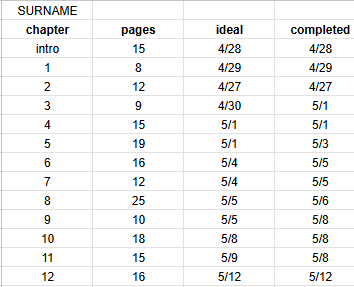
(Prior to completion, all columns except “completed” are filled out.)
Note that the page numbers above reflect an MS with fairly largely font; I am not editing 25 regular pages of a dense academic text in one day.
At this time, I also make sure to carefully review preliminary materials and the notes, bibliography, glossaries, art catalogs, et cetera, and factor in sufficient time to edit these as well. These materials can sometimes take just as long to edit as the main body of the text—and sometimes they take longer.
And That’s It
That’s what I do to get the ball rollin’. This is the initial stage, where the MS is still fresh and new—and my energy level is high. Eventually, the MS and I will battle it out and wear each other down, but that’s for another day.
Feel free to share what’s the same/different about your first copyediting steps!
Until next time,
Hannah
Copyeditor & Developmental Editor
This is a really helpful post, Hannah! Thank you for sharing.